Showing posts with label Email. Show all posts

Sunday, September 8, 2013

How to change your Facebook log in email address


If you are not satisfied about using your current Facebook email address every time you log in to Facebook and want to change it for another email address, this guide will show you how to change your Facebook account primary email in 5 simple steps:

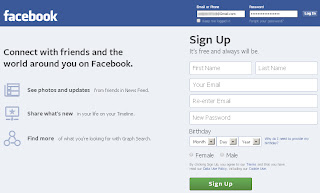
1 To change your Facebook log in email, go first to the Facebook homepage and log in with your registered account email and password.


2 Go to your Facebook Account Settings, on the first page of General Account Settings click on third option which is Email just under the Username in order to edit your Facebook primary email address.

3 Now just under your Primary email used for log in, you'll find the option of add another email click on it, then add your new email address; the email that you want to use as your new Facebook log in email.
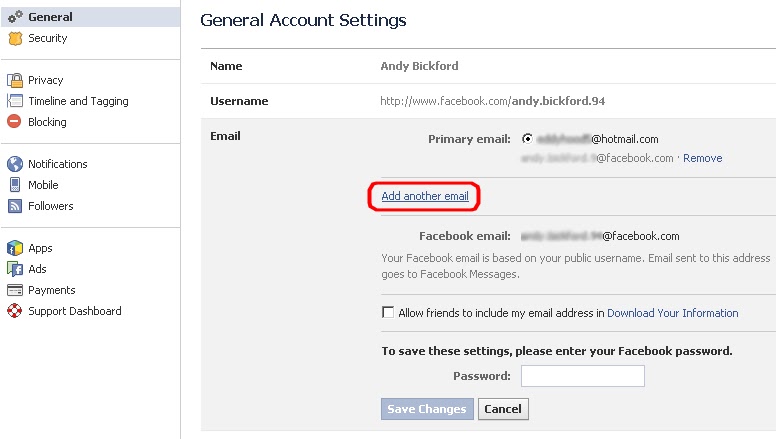
Add another email address to your Facebook account.

4 To save the new settings type your Facebook password and click on Save Changes, now a confirmation email will be sent to your new email address in order to confirm it.

Saving your new Facebook email address.

5 Finally, and once you've confirmed your new email address, go back to the Email option on the Facebook Account Settings page and check on your new email address to use it as your new log in email, type your password again and click on Save Changes.

Change your Facebook account primary email address.

Now you did change your Facebook primary email address to a new one that you'll use to log in with your Facebook account in the next times. You can change your log in Facebook email address as many times as you want following the same steps above.

That's all, I hope you find this article helpful for you.

Sunday, August 25, 2013

How to get your Facebook account back after being disabled


There are several reasons where Facebook could have disabled your account for and blocked you to gain access to it again, with or without a warning some of the reasons are logic whereas some others are made by mistake. However if you are trying to log in into your Facebook account and it says: Your Facebook account has been disabled, Here's the two questions that come into your mind, why, and how to get my Facebook account back?, this means that you must have violated Facebook statement of rights and responsibilities in a way or in another.

Common reasons why would Facebook disable your account:


Facebook Fake Name: Your Facebook account can easily get disabled because of a fake Facebook name or when you try to use a celebrity name or just include abnormal words or characters in your Facebook name.

Adding too many Facebook friends: while the maximum limit for adding friends is 5000 friends, you may get blocked for adding too many friends.

Joining a large number of Facebook groups: the maximum limit for joining Facebook groups is 200 groups per account. but your account may still get disabled for joining more than 100 groups.

Writing offensive comments or status: If you have written offensive posts on your wall or someone's else wall or in a Facebook page, you may get easily reported to Facebook.

Spamming: If you add too many duplicate links or promotional content in Facebook posts or messages within one session you're account is definitely going to be disabled.

Underage: If you're under 13 years old, you are not allowed to have a Facebook account.

Security Disable: Your account may get disabled for security reasons, as it may be someone is trying to hack your account or steal your identity, but in that case you will get an access to it just by passing the account verification process.

How to get a disabled Facebook account back:

To enable your Facebook disabled account again, you need to contact the Facebook team by submitting an appeal to them, you need to fill out this form My Personal Account was Disable without having to log in to your Facebook account, first enter your disabled account email address, then your contact email address where Facebook can send you a reply, and your account name and date of birth as well, you can leave more details in the additional info box if you think that it's important. when you finish click on the blue button Send.


You should get a response from the Facebook team in less than a week, If you didn't receive any response try to contact them again.

How to protect your Facebook account from getting disabled:

However to avoid this happen again, make sure you read the Facebook statement of rights and responsibilities and not violate any of them as a Facebook user.

When thinking about changing your Facebook account name, keep away from using abnormal characters or symbols.

Don't think about spamming Facebook using your personal account, that's something Facebook would easily find out and take action against it.

Don't send more than two Facebook friend requests per week or learn How to find and cancel all friends requests on Facebook at once. and keep away from adding people that you don't know outside Facebook as it may cause you other problems.

That's all, I hope you find this article helpful for you.

Sunday, March 24, 2013

How to stop receiving notifications from Facebook to your Email


If you want to stop receiving all kinds of notifications coming from your facebook account to your email, just follow the next 4 steps:

1 First go to your Account Settings page.


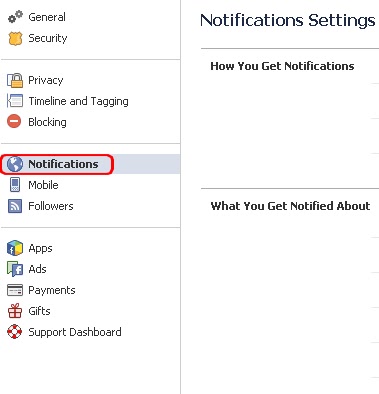
2 From the left sidebar choose Notifications.


3 Once you're on the notifications settings page, click on Edit at the top right of the Email tab line.


4 To stop receiving notifications to your email, select only notifications about your account, security and privacy, And then click on Close


Now you'll only get notified from facebook about your account security and privacy, that's all, I hope you find this article helpful for you.