Showing posts with label Facebook likes. Show all posts

Friday, September 27, 2019

How to change Facebook page's name


In today's world, having a Facebook’s page may be very essential in your marketing strategy to promote your brand, product or blog and will definitely help you to get more followers on social media.

Having a good Facebook page’s name will help you to get in touch with people who already know or people who don’t know about your product.

In this blog we are going to see how we can change a Facebook page’s name on desktop in very easy and simple steps.

In order to change your Facebook page’s name, please follow the next five steps:

1 Log in to your Facebook’s account and go to your Facebook page.

2 Now you are on your Facebook page’s dashboard select the button “See more” from the list of the left side of the screen

3 Now whole list has shown up, click on the button “About


4 In the menu “General” and under “Category” click on the button “Edit” next to the “Name” section.
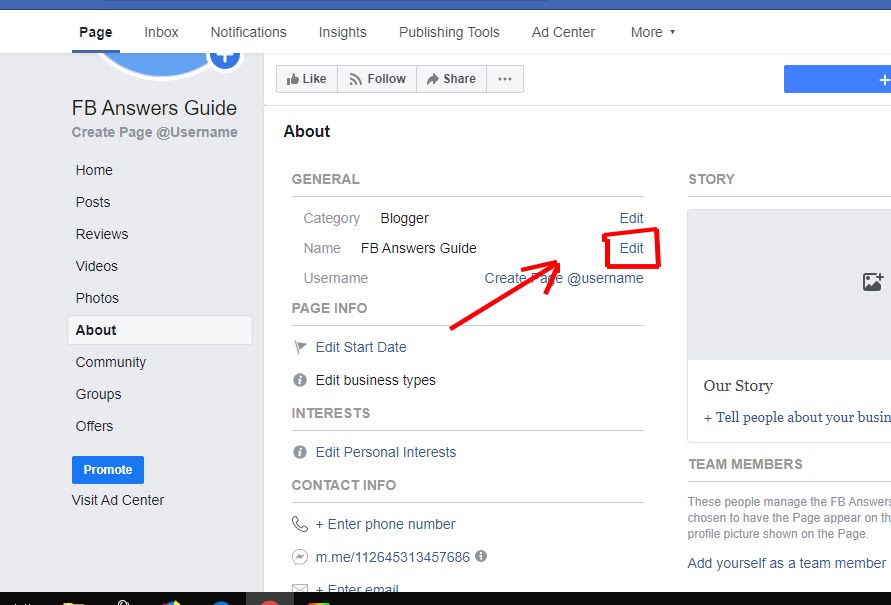
5 Now a new window page will show up, under the “Current Page name” click on “New Page name” in order to give your Facebook’s page a new name which helps to promote your business. In order to avoid problems, don’t use names of businesses or people who you don’t represent and make sure that your Facebook’s page name is authentic. In addition don’t use offending names because Facebook will not accept violating names. Finally you should not use the words “Facebook” or “official” in your new Facebook page’s name.


Your Facebook’s page name shouldn’t exceed 75 characters. Once you finish selecting the best name for your Facebook page, click on continue.

I hope this post has helped you to change your Facebook’s page on desktop.

Sunday, February 3, 2013

How to promote for your Facebook page on Facebook for free


Nowadays some page owners would pay money to advertise their pages on Facebook, but some others prefer not pay and make their business by their own, however today i'll show you some creative ways you can use to promote for your Facebook page on Facebook:

Use comments

One the powerful tools to promote your Facebook page is to comment other similar pages on Facebook inviting people to visit yours, this can be helpful if you're targeting a certain audience for your page's content.

Deal with other pages

This one common way used to promote pages, you can start liking other popular pages and ask them to like yours back, and that's how the fans of the other pages would intend to like yours, this can be a great way to generate traffic to your page without putting so much efforts.

Tag other facebook Pages

Tagging other pages on your page update status will help you generate more visitor to your facebook page, as it will show up in other fan pages, which means that you'll redirect many fans to visit your page.

Invite your friends list

This must be of the first thing to do when creating a page on Facebook, invite your friends to like your page so that your friends will become fans of your page, once you set up your page, Facebook will recommend you to do that and your friends will receive a notification asking them to like your page.

Be creative

Try to upload funny or unique pictures on your Facebook page, if someone of your page's fans likes the picture and decides to share it on his own timeline, he or she will let his friends to know about your page and take a visit to it.

SEO

Search Engine Optimization, If you want to get your Facebook page at the top search of any search engine like Google or Yahoo, you must consider reading about SEO tricks and ways to make your Facebook page appear in the first page on any search engine.

These are all my best advices for you, I hope you find this article helpful for you.